> ## Documentation Index
> Fetch the complete documentation index at: https://docs.usebracket.com/llms.txt
> Use this file to discover all available pages before exploring further.
# Deletes
> How Bracket handles deleted records
## Summary
Currently, Bracket supports delete syncs for specific data source integrations. In the table below, you can see which sources are supported.
*Currently, Bracket only supports deletes on tables & collections less than 0.5 GB*
When we say "Deletes supported," we mean that deletes can be made *to* the source when a paired record is deleted from the opposing source.
| Data source | Deletes supported? |
| ----------------------------------------------- | ---------------------- |
| [Postgres](/connecting/postgres_connecting) | Yes |
| [Salesforce](/database/salesforce_connecting) | Yes |
| [Hubspot](/database/hubspot_connecting) | No |
| [Airtable](/connecting/airtable_connecting) | Yes |
| [Google Sheets](/connecting/gsheets_connecting) | Yes |
| [MySQL](/database/mysql_connecting) | Yes |
| [MongoDB](/database/mongodb_connecting) | Manually on legacy app |
| [Firestore](/database/firebase_connecting) | No |
| [Snowflake](/database/snowflake_connecting) | No |
| [Notion](/connecting/notion_connecting) | Manually on legacy app |
Bracket scans for deletes every day at midnight UTC, regardless of your sync frequency. If you need deletes to sync faster, reach out to us at [eng@usebracket.com](mailto:eng@usebracket.com)!
## Manual deletes
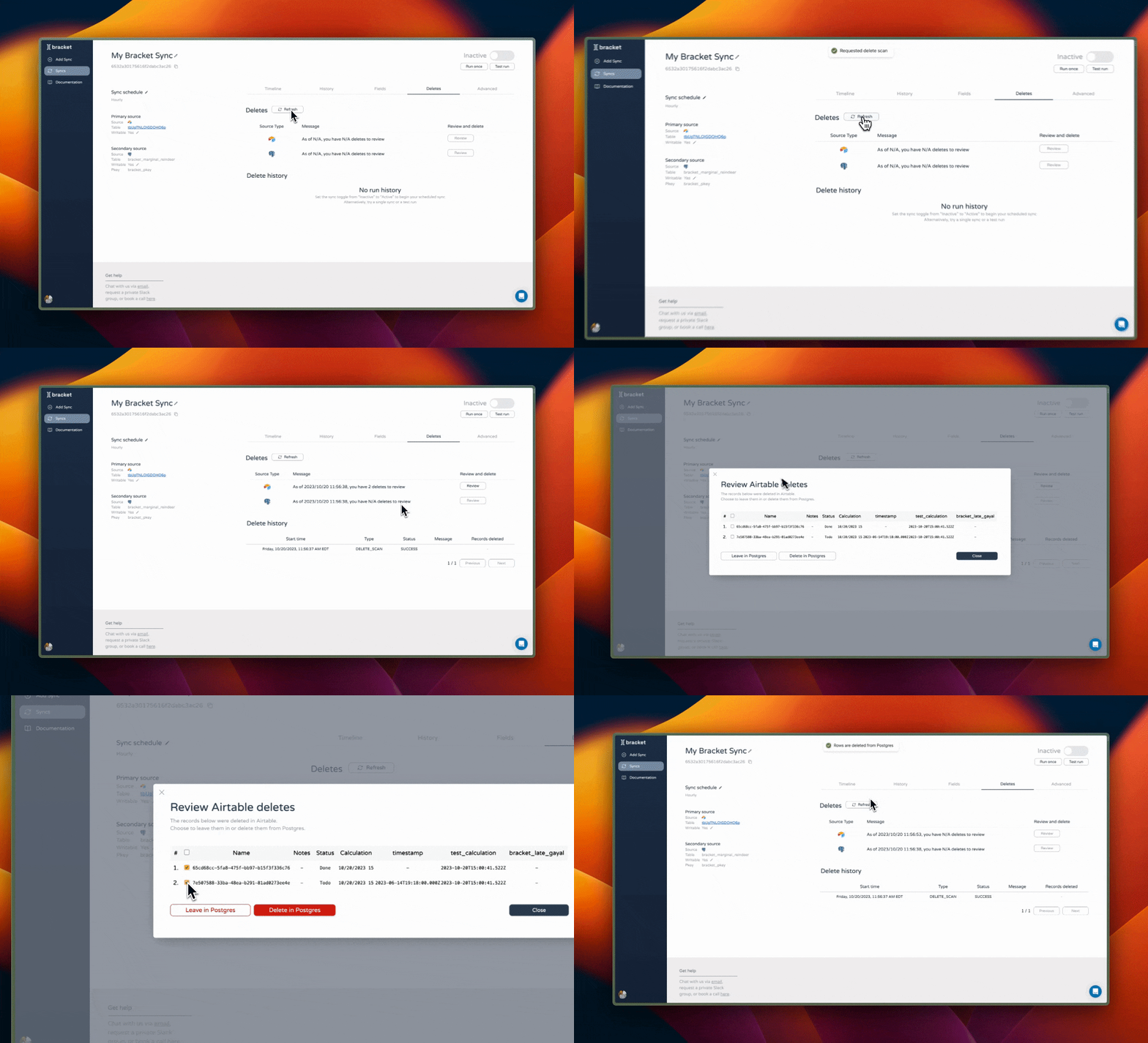
By default, all new syncs have a manual delete policy. If deletes to the data source are supported, you can review these deletes at any time by navigating to the "Deletes" tab.
Once there, you can see the history of delete scans and delete executions. You can initiate a new delete scan by clicking "Refresh," then manually review deletes from both synced sources.
If you choose to leave the records in the paired data source, Bracket will no longer give you the option to delete the record in the future. If you decide you'd like to delete it later, you'll need to do so directly in the data source.
 ## Automatic deletes
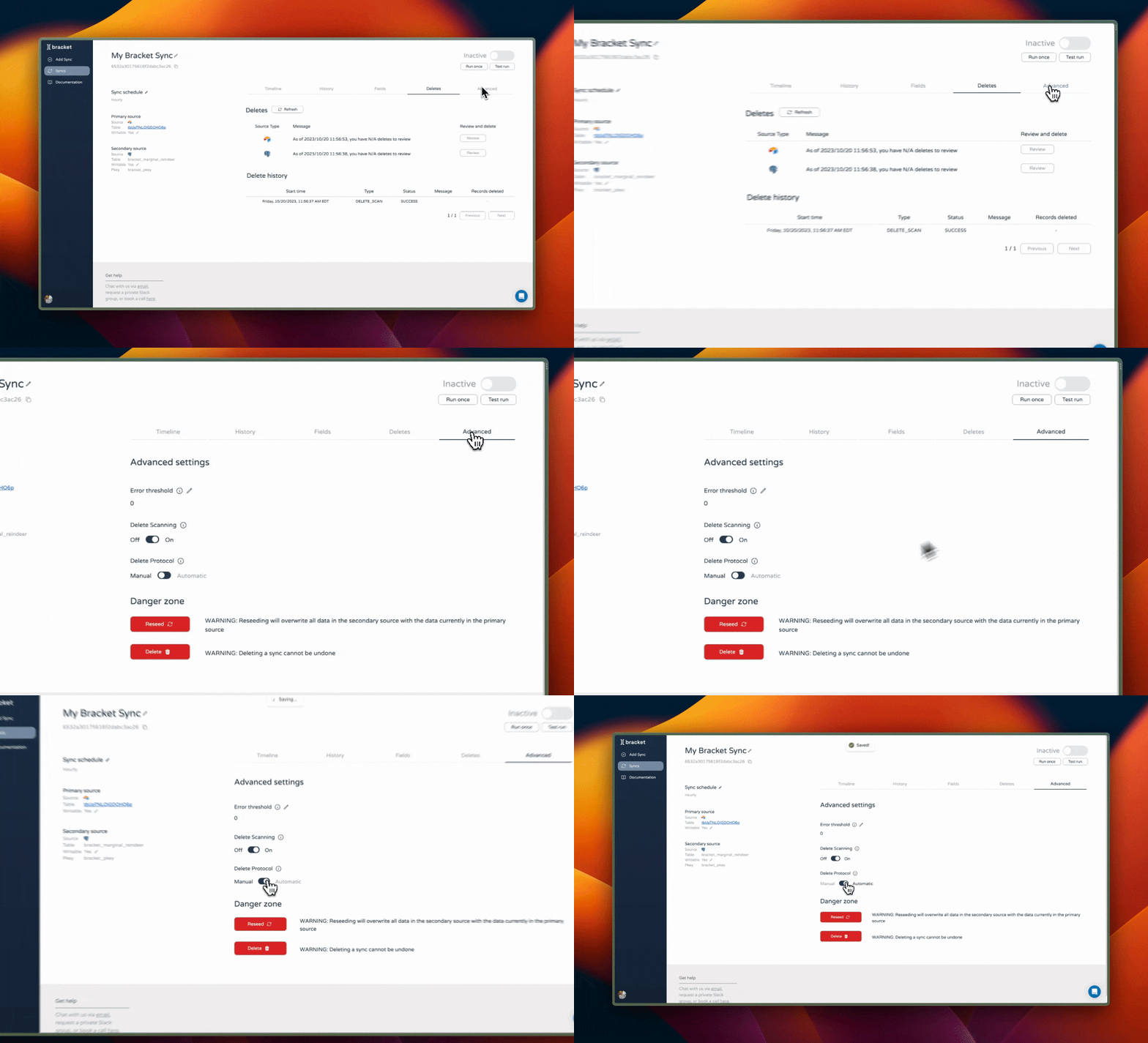
If you want all deleted records to automatically sync every day, then go to the "Advanced" tab on your sync and change the delete protocol to "Automatic."
With an automatic delete policy, Bracket will execute all deletes after its daily scan at midnight UTC.
## Automatic deletes
If you want all deleted records to automatically sync every day, then go to the "Advanced" tab on your sync and change the delete protocol to "Automatic."
With an automatic delete policy, Bracket will execute all deletes after its daily scan at midnight UTC.
 ## What if I delete records, and deletes are not supported?
If you delete records in one source, and deletes are not supported for the opposing source, then nothing will happen to the paired record in the opposing source. Essentially, the paired record becomes orphaned and can safely be deleted.
If you delete a record by mistake, and you would like it to enter back into the sync, we recommend copying its contents, deleting its paired record in the opposing source, then inserting it fresh into either source to ensure no data duplication.
## What if I delete records, and deletes are not supported?
If you delete records in one source, and deletes are not supported for the opposing source, then nothing will happen to the paired record in the opposing source. Essentially, the paired record becomes orphaned and can safely be deleted.
If you delete a record by mistake, and you would like it to enter back into the sync, we recommend copying its contents, deleting its paired record in the opposing source, then inserting it fresh into either source to ensure no data duplication.