> ## Documentation Index
> Fetch the complete documentation index at: https://docs.usebracket.com/llms.txt
> Use this file to discover all available pages before exploring further.
# Streaming
> How Bracket syncs using the streaming method
## Summary
The streaming sync method involves listening to events from Salesforce's [pub/sub API](https://developer.salesforce.com/docs/platform/pub-sub-api/overview) and a log of Postgres events, then transacting any events using the REST API and SQL.
The benefits of streaming are faster syncs (max 30-second latency), optimized Salesforce API usage, and less data stored on Bracket's servers.
Under streaming, the only data Bracket stores on its own servers is a list of primary keys corresponding to unprocessed records from Salesforce, which helps us retry any failed record syncs. This data can also be self-hosted on your servers.
This is the format of the `unprocessed_records` table:
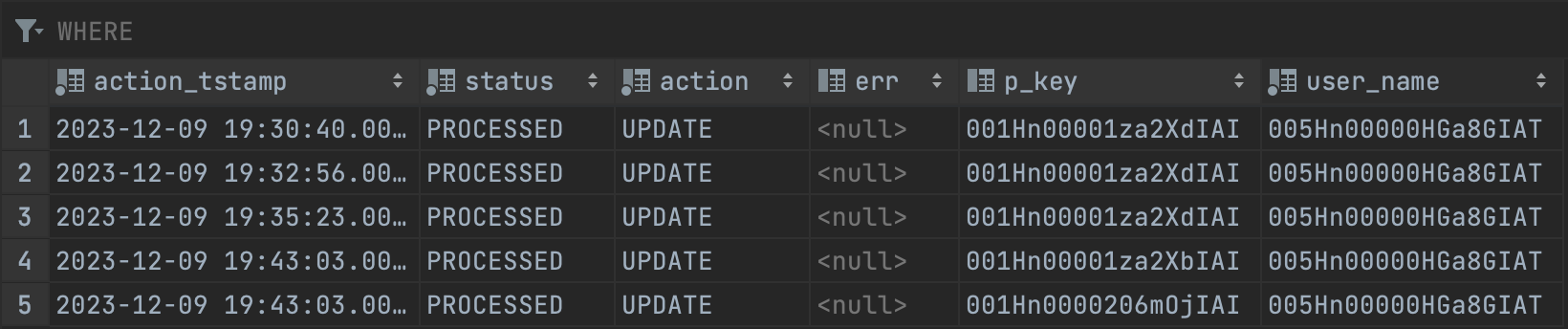 Right now, streaming is only available between Salesforce and Postgres, and only on the enterprise plan. Reach out to us at [eng@usebracket.com](mailto:eng@usebracket.com) to learn more.
## Requirements
### Salesforce
1. Bracket must have [a dedicated Salesforce account with the correct permission](https://app.tango.us/app/workflow/How-to-create--Bracket--profile-for-enabling-Salesforce-pub-sup-API-a74249f28f5043a0b380fbcd94779dc6). This helps us
separate
valid user edits from changes synced by Bracket.
2. Salesforce must be the primary source, meaning it will win any merge conflicts
3. The synced Salesforce object must have a unique `Id` field. In most objects, this is automatic.
### Postgres
1. There must be a separate schema called `bracket_audit`. This is where Bracket will store the trigger log table, which contains a history of Postgres events.
```sql Create schema statement theme={null}
CREATE SCHEMA IF NOT EXISTS bracket_audit;
```
2. Bracket must have a dedicated Postgres user with the permissions below:
```sql Create user statement theme={null}
CREATE USER bracket WITH PASSWORD '';
GRANT CONNECT, CREATE ON DATABASE TO bracket;
GRANT USAGE, CREATE ON SCHEMA bracket_audit TO bracket;
GRANT SELECT, INSERT, UPDATE, DELETE, REFERENCES, TRIGGER ON ALL TABLES IN SCHEMA bracket_audit TO bracket;
GRANT EXECUTE ON ALL FUNCTIONS IN SCHEMA bracket_audit TO bracket;
```
3. Any synced table has `bracket_pkey` as the primary key field, with UUIDv4 values. Bracket will generate these for you for any created tables.
4. Any synced table has a field called `id`, which syncs with the Salesforce ID field.
5. You should see the following sql executed in your postgres:
```sql create_schema.sql theme={null}
CREATE SCHEMA IF NOT EXISTS bracket_audit;
```
```sql create_table.sql theme={null}
CREATE TABLE IF NOT EXISTS bracket_audit."${tableName}_log" (
user_name TEXT,
action_tstamp TIMESTAMP WITH TIME ZONE NOT NULL DEFAULT current_timestamp,
status TEXT NOT NULL CHECK (status IN (${getEnumValuesAsString(EventStatus)})) DEFAULT '${EventStatus.unprocessed}',
action TEXT NOT NULL CHECK (action IN (${getEnumValuesAsString(EventAction)})),
err TEXT DEFAULT NULL,
p_key UUID,
original_data TEXT,
new_data TEXT,
query TEXT
);
```
```sql create_function.sql theme={null}
CREATE OR REPLACE FUNCTION bracket_audit.${tableName}_if_modified_func()
RETURNS trigger AS $body$
DECLARE
v_old_data TEXT;
v_new_data TEXT;
BEGIN
if (session_user = 'bracket') then
RETURN NULL;
end if;
/* This dance with casting the NEW and OLD values to a ROW is not necessary in pg 9.0+ */
if (TG_OP = 'UPDATE') then
v_old_data := ROW(OLD.*);
v_new_data := ROW(NEW.*);
insert into bracket_audit."${tableName}_log" (
user_name, action, p_key, original_data, new_data, query
)
values
(
session_user :: TEXT,
TG_OP :: TEXT,
OLD.bracket_pkey :: UUID,
v_old_data,
v_new_data,
current_query()
);
RETURN NEW;
elsif (TG_OP = 'DELETE') then
v_old_data := ROW(OLD.*);
insert into bracket_audit."${tableName}_log" (
user_name, action, p_key, original_data, query
)
values
(
session_user :: TEXT,
TG_OP :: TEXT,
OLD.bracket_pkey :: UUID,
v_old_data,
current_query()
);
RETURN OLD;
elsif (TG_OP = 'INSERT') then
v_new_data := ROW(NEW.*);
insert into bracket_audit."${tableName}_log" (
user_name, action, p_key, new_data, query
)
values
(
session_user :: TEXT,
TG_OP :: TEXT,
NEW.bracket_pkey :: UUID,
v_new_data,
current_query()
);
RETURN NEW;
else RAISE WARNING '[bracket_audit.${tableName}_IF_MODIFIED_FUNC] - Other action occurred: %, at
%',
TG_OP,
now();
RETURN NULL;
end if;
EXCEPTION WHEN data_exception THEN RAISE WARNING '[bracket_audit.${tableName}_IF_MODIFIED_FUNC] -
UDF
ERROR [DATAEXCEPTION] - SQLSTATE: %, SQLERRM: %',
SQLSTATE,
SQLERRM;
RETURN NULL;
WHEN unique_violation THEN RAISE WARNING '[bracket_audit.${tableName}_IF_MODIFIED_FUNC] - UDF
ERROR
[UNIQUE] -SQLSTATE: %, SQLERRM: %',
SQLSTATE,
SQLERRM;
RETURN NULL;
WHEN others THEN RAISE WARNING '[bracket_audit.${tableName}_IF_MODIFIED_FUNC] - UDF ERROR
[OTHER] -
SQLSTATE: %,SQLERRM: %',
SQLSTATE,
SQLERRM;
RETURN NULL;
END;
$body$ LANGUAGE plpgsql
SECURITY DEFINER
SET search_path = pg_catalog;
```
```sql create_trigger.sql theme={null}
CREATE TRIGGER ${tableName}_if_modified_trg
AFTER INSERT OR UPDATE OR DELETE ON ${schemaString}"${tableName}"
FOR EACH ROW EXECUTE PROCEDURE bracket_audit.${tableName}_if_modified_func();
```
## The streaming sync method, step-by-step
At cadences as fast as every 30 seconds, Bracket performs the following:
Bracket checks the Salesforce pub/sub API to see if any events have occurred since the last
successful data read/write. E.g., if the last change read by Bracket on your Salesforce
object was processed six minutes ago, Bracket will only check the pub/sub API for any events
with a `commitTimestamp` greater than the last six minutes.
If there are no new events, and it's been less than 10 minutes since the last successful
poll, Bracket does not poll Salesforce--this is where Brackets saves you from costly REST
API usage.
If there are events reported by the pub/sub API, *or* if it's been greater than 10 minutes since the last poll, Bracket polls Salesforce via REST API for all records modified or created since the last successful poll. We store these records in `unprocessed_records`.
Consistent 10-minute polling intervals make sure any events missed by pub/sub are still ultimately synced.
Bracket reads records from the Postgres trigger log that have `status='UNPROCESSED'` and queries records with the corresponding primary keys from the synced Postgres table.
Bracket writes Salesforce edits to Postgres. The record is then marked as `PROCESSED` or
`ERROR` in `unprocessed_records`. If `ERRORED`, Bracket will try syncing the erroneous
record at the next poll attempt only if a new change has been detected.
If during a given sync period a corresponding Postgres record was also updated, Bracket will remove the record from the next step.
Bracket writes Postgres edits to Salesforce. For inserts, which don't yet have a Salesforce
ID assigned, Bracket makes a "round trip", capturing the newly-created SFID in the insert
response and updating the Postgres record with it.
Right now, streaming is only available between Salesforce and Postgres, and only on the enterprise plan. Reach out to us at [eng@usebracket.com](mailto:eng@usebracket.com) to learn more.
## Requirements
### Salesforce
1. Bracket must have [a dedicated Salesforce account with the correct permission](https://app.tango.us/app/workflow/How-to-create--Bracket--profile-for-enabling-Salesforce-pub-sup-API-a74249f28f5043a0b380fbcd94779dc6). This helps us
separate
valid user edits from changes synced by Bracket.
2. Salesforce must be the primary source, meaning it will win any merge conflicts
3. The synced Salesforce object must have a unique `Id` field. In most objects, this is automatic.
### Postgres
1. There must be a separate schema called `bracket_audit`. This is where Bracket will store the trigger log table, which contains a history of Postgres events.
```sql Create schema statement theme={null}
CREATE SCHEMA IF NOT EXISTS bracket_audit;
```
2. Bracket must have a dedicated Postgres user with the permissions below:
```sql Create user statement theme={null}
CREATE USER bracket WITH PASSWORD '';
GRANT CONNECT, CREATE ON DATABASE TO bracket;
GRANT USAGE, CREATE ON SCHEMA bracket_audit TO bracket;
GRANT SELECT, INSERT, UPDATE, DELETE, REFERENCES, TRIGGER ON ALL TABLES IN SCHEMA bracket_audit TO bracket;
GRANT EXECUTE ON ALL FUNCTIONS IN SCHEMA bracket_audit TO bracket;
```
3. Any synced table has `bracket_pkey` as the primary key field, with UUIDv4 values. Bracket will generate these for you for any created tables.
4. Any synced table has a field called `id`, which syncs with the Salesforce ID field.
5. You should see the following sql executed in your postgres:
```sql create_schema.sql theme={null}
CREATE SCHEMA IF NOT EXISTS bracket_audit;
```
```sql create_table.sql theme={null}
CREATE TABLE IF NOT EXISTS bracket_audit."${tableName}_log" (
user_name TEXT,
action_tstamp TIMESTAMP WITH TIME ZONE NOT NULL DEFAULT current_timestamp,
status TEXT NOT NULL CHECK (status IN (${getEnumValuesAsString(EventStatus)})) DEFAULT '${EventStatus.unprocessed}',
action TEXT NOT NULL CHECK (action IN (${getEnumValuesAsString(EventAction)})),
err TEXT DEFAULT NULL,
p_key UUID,
original_data TEXT,
new_data TEXT,
query TEXT
);
```
```sql create_function.sql theme={null}
CREATE OR REPLACE FUNCTION bracket_audit.${tableName}_if_modified_func()
RETURNS trigger AS $body$
DECLARE
v_old_data TEXT;
v_new_data TEXT;
BEGIN
if (session_user = 'bracket') then
RETURN NULL;
end if;
/* This dance with casting the NEW and OLD values to a ROW is not necessary in pg 9.0+ */
if (TG_OP = 'UPDATE') then
v_old_data := ROW(OLD.*);
v_new_data := ROW(NEW.*);
insert into bracket_audit."${tableName}_log" (
user_name, action, p_key, original_data, new_data, query
)
values
(
session_user :: TEXT,
TG_OP :: TEXT,
OLD.bracket_pkey :: UUID,
v_old_data,
v_new_data,
current_query()
);
RETURN NEW;
elsif (TG_OP = 'DELETE') then
v_old_data := ROW(OLD.*);
insert into bracket_audit."${tableName}_log" (
user_name, action, p_key, original_data, query
)
values
(
session_user :: TEXT,
TG_OP :: TEXT,
OLD.bracket_pkey :: UUID,
v_old_data,
current_query()
);
RETURN OLD;
elsif (TG_OP = 'INSERT') then
v_new_data := ROW(NEW.*);
insert into bracket_audit."${tableName}_log" (
user_name, action, p_key, new_data, query
)
values
(
session_user :: TEXT,
TG_OP :: TEXT,
NEW.bracket_pkey :: UUID,
v_new_data,
current_query()
);
RETURN NEW;
else RAISE WARNING '[bracket_audit.${tableName}_IF_MODIFIED_FUNC] - Other action occurred: %, at
%',
TG_OP,
now();
RETURN NULL;
end if;
EXCEPTION WHEN data_exception THEN RAISE WARNING '[bracket_audit.${tableName}_IF_MODIFIED_FUNC] -
UDF
ERROR [DATAEXCEPTION] - SQLSTATE: %, SQLERRM: %',
SQLSTATE,
SQLERRM;
RETURN NULL;
WHEN unique_violation THEN RAISE WARNING '[bracket_audit.${tableName}_IF_MODIFIED_FUNC] - UDF
ERROR
[UNIQUE] -SQLSTATE: %, SQLERRM: %',
SQLSTATE,
SQLERRM;
RETURN NULL;
WHEN others THEN RAISE WARNING '[bracket_audit.${tableName}_IF_MODIFIED_FUNC] - UDF ERROR
[OTHER] -
SQLSTATE: %,SQLERRM: %',
SQLSTATE,
SQLERRM;
RETURN NULL;
END;
$body$ LANGUAGE plpgsql
SECURITY DEFINER
SET search_path = pg_catalog;
```
```sql create_trigger.sql theme={null}
CREATE TRIGGER ${tableName}_if_modified_trg
AFTER INSERT OR UPDATE OR DELETE ON ${schemaString}"${tableName}"
FOR EACH ROW EXECUTE PROCEDURE bracket_audit.${tableName}_if_modified_func();
```
## The streaming sync method, step-by-step
At cadences as fast as every 30 seconds, Bracket performs the following:
Bracket checks the Salesforce pub/sub API to see if any events have occurred since the last
successful data read/write. E.g., if the last change read by Bracket on your Salesforce
object was processed six minutes ago, Bracket will only check the pub/sub API for any events
with a `commitTimestamp` greater than the last six minutes.
If there are no new events, and it's been less than 10 minutes since the last successful
poll, Bracket does not poll Salesforce--this is where Brackets saves you from costly REST
API usage.
If there are events reported by the pub/sub API, *or* if it's been greater than 10 minutes since the last poll, Bracket polls Salesforce via REST API for all records modified or created since the last successful poll. We store these records in `unprocessed_records`.
Consistent 10-minute polling intervals make sure any events missed by pub/sub are still ultimately synced.
Bracket reads records from the Postgres trigger log that have `status='UNPROCESSED'` and queries records with the corresponding primary keys from the synced Postgres table.
Bracket writes Salesforce edits to Postgres. The record is then marked as `PROCESSED` or
`ERROR` in `unprocessed_records`. If `ERRORED`, Bracket will try syncing the erroneous
record at the next poll attempt only if a new change has been detected.
If during a given sync period a corresponding Postgres record was also updated, Bracket will remove the record from the next step.
Bracket writes Postgres edits to Salesforce. For inserts, which don't yet have a Salesforce
ID assigned, Bracket makes a "round trip", capturing the newly-created SFID in the insert
response and updating the Postgres record with it.